|
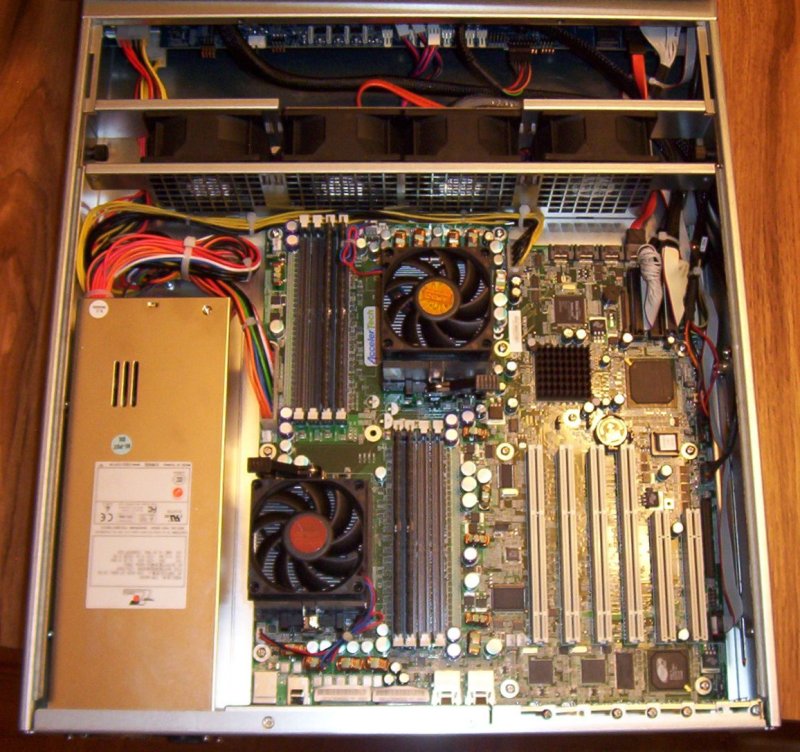
I am fortunate to have in my possession, a Dual Opteron 246 server, in a 2U case, with 8GB of RAM,
and 400GB of SATA drive. I have installed FreeBSD 6.1-RELEASE on it and I am in the process of
upgrading it to 6.1-STABLE.
No, I did not have a sudden influx of wealth. Instead, my good fortune is courtesy of
iXsystems. They have graciously donated this fine
piece of hardware to me. Over the next few weeks I will continue to set it up and configure
it for use.
As mentioned, the system has 8GB of RAM. That is in four sticks of 2GB each. That leaves me with
4 free memory slots. Nice. :)
The case has hot swap bays for eight drives.
|
|
Hopefully, this will section will answer some of your questions as to what is in the box.
First, some dmesg output:
# less /var/run/dmesg.boot
Copyright (c) 1992-2006 The FreeBSD Project.
Copyright (c) 1979, 1980, 1983, 1986, 1988, 1989, 1991, 1992, 1993, 1994
        The Regents of the University of California. All rights reserved.
FreeBSD 6.1-STABLE #0: Mon Jun  5 13:47:07 EDT 2006
    root@opti.unixathome.org:/usr/obj/usr/src/sys/OPTI
ACPI APIC Table: <PTLTD          APIC  >
Timecounter "i8254" frequency 1193182 Hz quality 0
CPU: AMD Opteron(tm) Processor 246 (2004.56-MHz K8-class CPU)
  Origin = "AuthenticAMD"  Id = 0xf5a  Stepping = 10
  Features=0x78bfbff<FPU,VME,DE,PSE,TSC,MSR,PAE,MCE,CX8,APIC,SEP,MTRR,PGE,MCA,CMOV,PAT,
                        PSE36,CLFLUSH,MMX,FXSR,SSE,SSE2>
  AMD Features=0xe0500800<SYSCALL,NX,MMX+,LM,3DNow+,3DNow>
real memory  = 8589934592 (8192 MB)
avail memory = 8248225792 (7866 MB)
FreeBSD/SMP: Multiprocessor System Detected: 2 CPUs
 cpu0 (BSP): APIC ID:  0
 cpu1 (AP): APIC ID:  1
MADT: Forcing active-low polarity and level trigger for SCI
ioapic0 <Version 1.1> irqs 0-23 on motherboard
ioapic1 <Version 1.1> irqs 24-27 on motherboard
ioapic2 <Version 1.1> irqs 28-31 on motherboard
kbd1 at kbdmux0
acpi0: <PTLTD    XSDT> on motherboard
acpi0: Power Button (fixed)
acpi0: Sleep Button (fixed)
unknown: I/O range not supported
unknown: I/O range not supported
Timecounter "ACPI-fast" frequency 3579545 Hz quality 1000
acpi_timer0: <24-bit timer at 3.579545MHz> port 0x8008-0x800b on acpi0
cpu0: <ACPI CPU> on acpi0
cpu1: <ACPI CPU> on acpi0
acpi_button0: <Power Button> on acpi0
pcib0: <ACPI Host-PCI bridge> port 0xcf8-0xcff on acpi0
pci0: <ACPI PCI bus> on pcib0
pcib1: <ACPI PCI-PCI bridge> at device 6.0 on pci0
pci1: <ACPI PCI bus> on pcib1
ohci0: <OHCI (generic) USB controller> mem 0xfc100000-0xfc100fff irq 19 at device 0.0 on pci1
ohci0: [GIANT-LOCKED]
usb0: OHCI version 1.0, legacy support
usb0: <OHCI (generic) USB controller> on ohci0
usb0: USB revision 1.0
uhub0: AMD OHCI root hub, class 9/0, rev 1.00/1.00, addr 1
uhub0: 3 ports with 3 removable, self powered
ohci1: <OHCI (generic) USB controller> mem 0xfc101000-0xfc101fff irq 19 at device 0.1 on pci1
ohci1: [GIANT-LOCKED]
usb1: OHCI version 1.0, legacy support
usb1: <OHCI (generic) USB controller> on ohci1
usb1: USB revision 1.0
uhub1: AMD OHCI root hub, class 9/0, rev 1.00/1.00, addr 1
uhub1: 3 ports with 3 removable, self powered
pci1: <display, VGA> at device 6.0 (no driver attached)
isab0: <PCI-ISA bridge> at device 7.0 on pci0
isa0: <ISA bus> on isab0
atapci0: <AMD 8111 UDMA133 controller> port 0x1f0-0x1f7,0x3f6,
           0x170-0x177,0x376,0x1020-0x102f at device 7.1 on pci0
ata0: <ATA channel 0> on atapci0
ata1: <ATA channel 1> on atapci0
pci0: <bridge> at device 7.3 (no driver attached)
pcib2: <ACPI PCI-PCI bridge> at device 10.0 on pci0
pci2: <ACPI PCI bus> on pcib2
bge0: <Broadcom BCM5702 Gigabit Ethernet, ASIC rev. 0x1002>
           mem 0xfe000000-0xfe00ffff irq 27 at device 3.0 on pci2
miibus0: <MII bus> on bge0
brgphy0: <BCM5703 10/100/1000baseTX PHY> on miibus0
brgphy0:  10baseT, 10baseT-FDX, 100baseTX, 100baseTX-FDX, 1000baseTX,
           1000baseTX-FDX, auto
bge0: Ethernet address: 00:50:45:5c:fd:e6
bge1: <Broadcom BCM5702 Gigabit Ethernet, ASIC rev. 0x1002>
           mem 0xfe010000-0xfe01ffff irq 27 at device 4.0 on pci2
miibus1: <MII bus> on bge1
brgphy1: <BCM5703 10/100/1000baseTX PHY> on miibus1
brgphy1:  10baseT, 10baseT-FDX, 100baseTX, 100baseTX-FDX, 1000baseTX,
           1000baseTX-FDX, auto
bge1: Ethernet address: 00:50:45:5c:fd:e7
atapci1: <SiI 3114 SATA150 controller> port 0x3020-0x3027,
           0x3014-0x3017,0x3018-0x301f,0x3010-0x3013,0x3000-0x300f mem 0xfe
020000-0xfe0203ff irq 25 at device 5.0 on pci2
ata2: <ATA channel 0> on atapci1
ata3: <ATA channel 1> on atapci1
ata4: <ATA channel 2> on atapci1
ata5: <ATA channel 3> on atapci1
pci0: <base peripheral, interrupt controller> at device 10.1 (no driver attached)
pcib3: <ACPI PCI-PCI bridge> at device 11.0 on pci0
pci3: <ACPI PCI bus> on pcib3
pci0: <base peripheral, interrupt controller> at device 11.1 (no driver attached)
atkbdc0: <Keyboard controller (i8042)> port 0x60,0x64 irq 1 on acpi0
atkbd0: <AT Keyboard> flags 0x1 irq 1 on atkbdc0
device_attach: atkbd0 attach returned 6
fdc0: <floppy drive controller> port 0x3f0-0x3f5,0x3f7 irq 6 drq 2 on acpi0
fdc0: [FAST]
fd0: <1440-KB 3.5" drive> on fdc0 drive 0
sio0: <16550A-compatible COM port> port 0x3f8-0x3ff irq 4 flags 0x10 on acpi0
sio0: type 16550A
sio1: <16550A-compatible COM port> port 0x2f8-0x2ff irq 3 on acpi0
sio1: type 16550A
ppc0: <ECP parallel printer port> port 0x378-0x37f,0x778-0x77f irq 7 drq 4 on acpi0
ppc0: SMC-like chipset (ECP/EPP/PS2/NIBBLE) in COMPATIBLE mode
ppc0: FIFO with 16/16/8 bytes threshold
ppbus0: <Parallel port bus> on ppc0
plip0: <PLIP network interface> on ppbus0
lpt0: <Printer> on ppbus0
lpt0: Interrupt-driven port
ppi0: <Parallel I/O> on ppbus0
orm0: <ISA Option ROMs> at iomem 0xc0000-0xc7fff,0xc8000-0xc97ff,
           0xc9800-0xcafff,0xcb000-0xcf7ff on isa0
sc0: <System console> at flags 0x100 on isa0
sc0: VGA <16 virtual consoles, flags=0x300>
vga0: <Generic ISA VGA> at port 0x3c0-0x3df iomem 0xa0000-0xbffff on isa0
ukbd0: vendor 0x1241 product 0x1203, rev 1.00/2.10, addr 2, iclass 3/1
kbd0 at ukbd0
uhid0: vendor 0x1241 product 0x1203, rev 1.00/2.10, addr 2, iclass 3/1
Timecounters tick every 1.000 msec
module_register_init: MOD_LOAD (amr_linux, 0xffffffff8062c050, 0) error 6
acd0: CDROM <SR244W/T01A> at ata1-master UDMA33
ad4: 381554MB <Seagate ST3400832AS 3.03> at ata2-master SATA150
SMP: AP CPU #1 Launched!
Trying to mount root from ufs:/dev/ad4s1a
bge0: link state changed to UP
Followed by some pci descriptions:
#  pciconf -lv
pcib1@pci0:6:0: class=0x060400 card=0x000000c0 chip=0x74601022 rev=0x07 hdr=0x01
    vendor   = 'Advanced Micro Devices (AMD)'
    device   = 'AMD-8111 PCI Bridge'
    class    = bridge
    subclass = PCI-PCI
isab0@pci0:7:0: class=0x060100 card=0x3016161f chip=0x74681022 rev=0x05 hdr=0x00
    vendor   = 'Advanced Micro Devices (AMD)'
    device   = 'AMD-8111 LPC Bridge'
    class    = bridge
    subclass = PCI-ISA
atapci0@pci0:7:1:       class=0x01018a card=0x3016161f chip=0x74691022 rev=0x03 hdr=0x00
    vendor   = 'Advanced Micro Devices (AMD)'
    device   = 'AMD-8111 UltraATA/133 Controller'
    class    = mass storage
    subclass = ATA
none0@pci0:7:3: class=0x068000 card=0x3016161f chip=0x746b1022 rev=0x05 hdr=0x00
    vendor   = 'Advanced Micro Devices (AMD)'
    device   = 'AMD-8111 ACPI System Management Controller'
    class    = bridge
pcib2@pci0:10:0:        class=0x060400 card=0x000000a0 chip=0x74501022 rev=0x12 hdr=0x01
    vendor   = 'Advanced Micro Devices (AMD)'
    device   = 'AMD-8131 PCI-X Bridge'
    class    = bridge
    subclass = PCI-PCI
none1@pci0:10:1:        class=0x080010 card=0x74511022 chip=0x74511022 rev=0x01 hdr=0x00
    vendor   = 'Advanced Micro Devices (AMD)'
    device   = 'AMD-8131 PCI-X IOAPIC'
    class    = base peripheral
    subclass = interrupt controller
pcib3@pci0:11:0:        class=0x060400 card=0x000000a0 chip=0x74501022 rev=0x12 hdr=0x01
    vendor   = 'Advanced Micro Devices (AMD)'
    device   = 'AMD-8131 PCI-X Bridge'
    class    = bridge
    subclass = PCI-PCI
none2@pci0:11:1:        class=0x080010 card=0x74511022 chip=0x74511022 rev=0x01 hdr=0x00
    vendor   = 'Advanced Micro Devices (AMD)'
    device   = 'AMD-8131 PCI-X IOAPIC'
    class    = base peripheral
    subclass = interrupt controller
hostb0@pci0:24:0:       class=0x060000 card=0x00000000 chip=0x11001022 rev=0x00 hdr=0x00
    vendor   = 'Advanced Micro Devices (AMD)'
    device   = 'Athlon 64 / Opteron HyperTransport Technology Configuration'
    class    = bridge
    subclass = HOST-PCI
hostb1@pci0:24:1:       class=0x060000 card=0x00000000 chip=0x11011022 rev=0x00 hdr=0x00
    vendor   = 'Advanced Micro Devices (AMD)'
    device   = 'Athlon 64 / Opteron Address Map'
    class    = bridge
    subclass = HOST-PCI
hostb2@pci0:24:2:       class=0x060000 card=0x00000000 chip=0x11021022 rev=0x00 hdr=0x00
    vendor   = 'Advanced Micro Devices (AMD)'
    device   = 'Athlon 64 / Opteron DRAM Controller'
    class    = bridge
    subclass = HOST-PCI
hostb3@pci0:24:3:       class=0x060000 card=0x00000000 chip=0x11031022 rev=0x00 hdr=0x00
    vendor   = 'Advanced Micro Devices (AMD)'
    device   = 'Athlon 64 / Opteron Miscellaneous Control'
    class    = bridge
    subclass = HOST-PCI
hostb4@pci0:25:0:       class=0x060000 card=0x00000000 chip=0x11001022 rev=0x00 hdr=0x00
    vendor   = 'Advanced Micro Devices (AMD)'
    device   = 'Athlon 64 / Opteron HyperTransport Technology Configuration'
    class    = bridge
    subclass = HOST-PCI
hostb5@pci0:25:1:       class=0x060000 card=0x00000000 chip=0x11011022 rev=0x00 hdr=0x00
    vendor   = 'Advanced Micro Devices (AMD)'
    device   = 'Athlon 64 / Opteron Address Map'
    class    = bridge
    subclass = HOST-PCI
hostb6@pci0:25:2:       class=0x060000 card=0x00000000 chip=0x11021022 rev=0x00 hdr=0x00
    vendor   = 'Advanced Micro Devices (AMD)'
    device   = 'Athlon 64 / Opteron DRAM Controller'
    class    = bridge
    subclass = HOST-PCI
hostb7@pci0:25:3:       class=0x060000 card=0x00000000 chip=0x11031022 rev=0x00 hdr=0x00
    vendor   = 'Advanced Micro Devices (AMD)'
    device   = 'Athlon 64 / Opteron Miscellaneous Control'
    class    = bridge
    subclass = HOST-PCI
ohci0@pci1:0:0: class=0x0c0310 card=0x3016161f chip=0x74641022 rev=0x0b hdr=0x00
    vendor   = 'Advanced Micro Devices (AMD)'
    device   = 'AMD-8111 USB OpenHCI Host Controller'
    class    = serial bus
    subclass = USB
ohci1@pci1:0:1: class=0x0c0310 card=0x3016161f chip=0x74641022 rev=0x0b hdr=0x00
    vendor   = 'Advanced Micro Devices (AMD)'
    device   = 'AMD-8111 USB OpenHCI Host Controller'
    class    = serial bus
    subclass = USB
none3@pci1:6:0: class=0x030000 card=0x80081002 chip=0x47521002 rev=0x27 hdr=0x00
    vendor   = 'ATI Technologies Inc'
    device   = 'Rage XL PCI'
    class    = display
    subclass = VGA
bge0@pci2:3:0:  class=0x020000 card=0x000c14e4 chip=0x16a614e4 rev=0x02 hdr=0x00
    vendor   = 'Broadcom Corporation'
    device   = 'BCM5702X NetXtreme Gigabit Ethernet'
    class    = network
    subclass = ethernet
bge1@pci2:4:0:  class=0x020000 card=0x000c14e4 chip=0x16a614e4 rev=0x02 hdr=0x00
    vendor   = 'Broadcom Corporation'
    device   = 'BCM5702X NetXtreme Gigabit Ethernet'
    class    = network
    subclass = ethernet
atapci1@pci2:5:0:       class=0x010400 card=0x61141095 chip=0x31141095 rev=0x02 hdr=0x00
    vendor   = 'Silicon Image Inc (Was: CMD Technology Inc)'
    device   = 'Sil 3114 SATALink/SATARaid Controller'
    class    = mass storage
    subclass = RAID
|
|
The above timings are interesting, but what is much more important is finding out
what m/b we actually have. Documentation did not arrive with the server.
We had an investigation on our hands.
Armed with the photos, and the help of subdue on IRC, we determined the board we have
by comparing photographs and going through a process of elimination.
The first clue was the flash page when booting. It mentioned RioWorks. The next
major clue was the name AccelerTech, as shown in this picture
of the m/b (look just to the left of the CPU fan at the top of the m/b). This simple sticker eventually led
us to the ATO2161-DC
page in the AccelerTech website.
subdue reached his conclusion by looking at the various photographs on the
All AMD Dual Opteron Motherboard
page. Only two boards looked similar to my m/b: the second from the top
ATO2161-DC, and
ATO2161 third from the bottom.
The key criteria for comparison was four white connectors next to two smaller white connectors (i.e the PCI slots).
If you click on the BIOS/Drivers link for the two boards we found, you'll see that one matches my m/b.
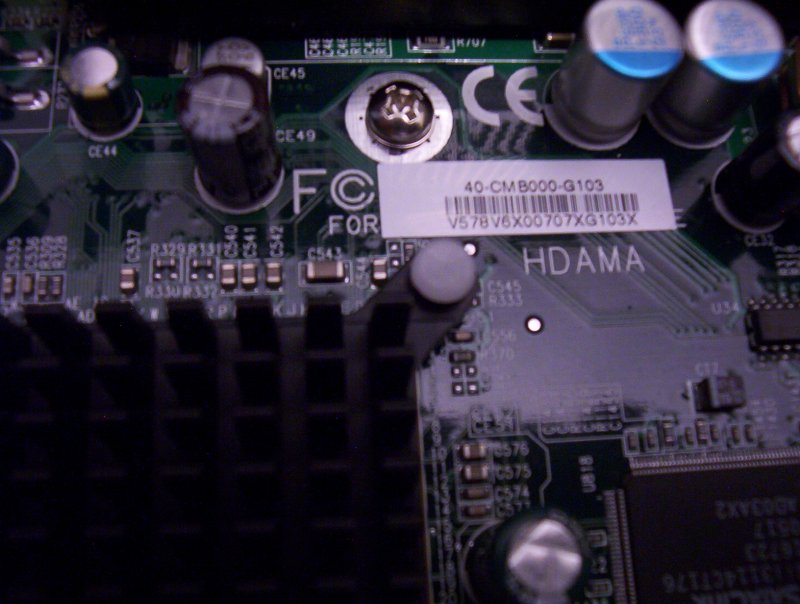
In this picture, you can see that the label is of the form
40-CMB000-G103. That matches the images for the
ATO2161-DC board
but not the ATO2161.
These images are used to determine the appropriate BIOS flavour for your board.
We were pretty certain we found the right board, mostly because of this sticker, combined with the specifications and visual similarities. The box was rebooted to determine the
BIOS version. It was HDAMA 2.13, which also matches the ATO2161-DC specification. This evidence further supported our conclusion.
Later that day, Doug White, who has previously used this very box when it was at iXsystems, said the m/b was a RioWorks HDAMA-G.
Doug also directed me to the Arima website, which is actually RioWorks.
At that website, we found
the HDAMA rev.G board.
The close up photo confirms a lot of what
we thought. Look at the RioWorks name at the lower right, next to the CPU socket. This is where my m/b has an
AccelerTech sticker. Then notice the label on the white connecter at the bottom left. The numbers on that connector
match up with the label used to match BIOS versions.
|